
Choosing school management software in India has become harder than ever. There are more vendors, longer feature lists and louder promises. Meanwhile the rules around schools keep changing: CBSE has tied board results to 75% attendance, NEP is replacing marks-only report cards with the Holistic Progress Card, and the DPDP Act now makes schools accountable for how they handle children's data.
A good school ERP should make these changes easier to manage, not add to the paperwork. This guide explains the 15 features that matter most in 2026, the questions to ask each vendor, and the warning signs that suggest a product won't last beyond its first term.
It is written for principals, school owners, trustees and administrators who want a clear way to compare options before booking demos.
What Is School Management Software?
School management software (also called a school ERP or school management system) is a single platform that runs the day-to-day operations of a school. That includes admissions, attendance, fees, exams, timetables, staff records and communication with parents.
Instead of separate registers, spreadsheets and WhatsApp groups, everyone works from the same set of records:
- Office staff register students and collect fees.
- Teachers mark attendance, enter marks and assign homework.
- Parents see their child's attendance, homework, results and dues.
- Principals and owners see the whole school at a glance and take decisions based on real numbers.
The value is not in going digital for its own sake. It lies in removing repeated data entry, reducing errors and giving every role exactly the information it needs.
Why 2026 Is a Turning Point for Indian Schools
Four changes make this year different from earlier ones:
- Attendance now affects board results. CBSE requires 75% attendance for Class 10 and 12 students to be eligible for results. Schools need to spot a shortfall in September, not in February.
- Report cards are changing. Under NEP 2020, the Holistic Progress Card (HPC) assesses students on skills, activities and competencies, not only marks.
- Board exams are more flexible. With CBSE Class 10 moving to two exam windows, exam scheduling and result management have become more involved.
- Student data is now a legal responsibility. The Digital Personal Data Protection (DPDP) Act and its 2025 Rules treat everyone under 18 as a child, and schools must handle that data with care and accountability.
Software built for 2015-style schools struggles with all four. Keep them in mind as you review the features below.
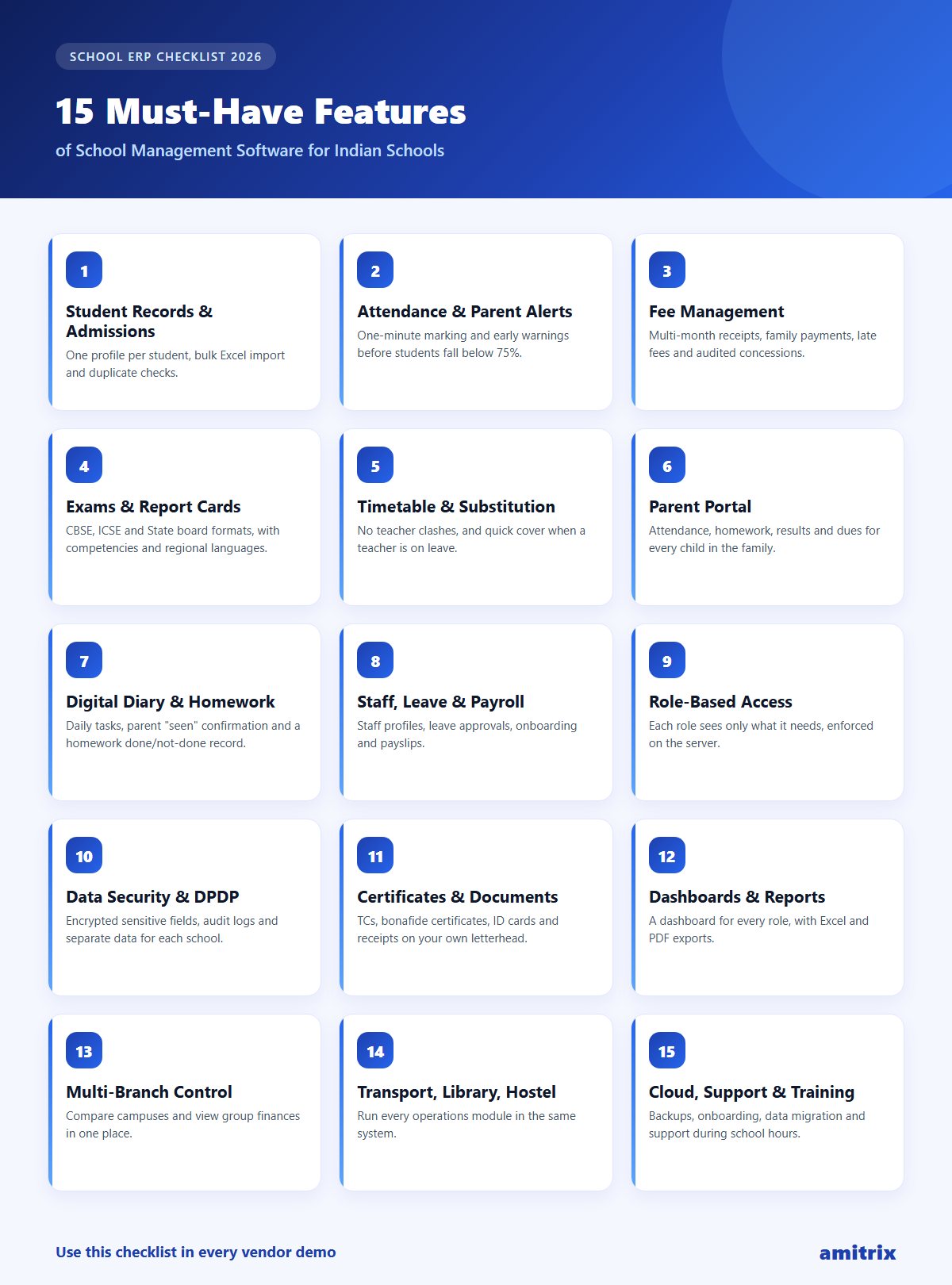
15 Must-Have Features of School Management Software
1. Student Information and Admissions
Everything starts with the student record. Look for one profile per student that holds personal details, guardians, class and section, medical notes, documents and history, all in one place.
Good systems also make admissions faster. Look for bulk upload from Excel, automatic generation of usernames and parent logins, and checks that stop duplicate admissions.
Ask the vendor: "Can I upload my existing 800 students from Excel in one go, and what happens to rows with errors?"
2. Attendance With Automatic Parent Alerts
Attendance is the feature your teachers will use every day, so it must be fast. Marking a full class should take less than a minute.
More importantly in 2026, the system should warn you early. You need per-student attendance percentages, monthly calendar views, and alerts when a student is heading below the 75% line. Parents should be notified of absences the same day, not at the end of the term.
Ask the vendor: "Show me every student in Class 10 who is currently below 75%." A good system answers this in one click.
3. Fee Management That Stops Leakage
For most private schools, fees are both the biggest source of income and the biggest source of disputes. A strong school fee management system should handle:
- Fee structures by class, with monthly, quarterly or yearly billing
- Automatic invoice generation for every student
- Collecting several months in a single payment, with one receipt
- Sibling or family payments, so a parent paying for two children gets one clear receipt
- Concessions and waivers with a proper record of who approved them and why
- Late fees with grace periods and caps
- Defaulter lists and printable due slips
- Collection reports by class, month, date and cashier
An audit trail on concessions matters more than most schools realise. Without one, every discount is a verbal promise that nobody can check later.
Ask the vendor: "If a principal approves a concession, where can I see that decision six months later?"
4. Exams, Marks and Multi-Board Report Cards
Your exam module should match the way your board actually assesses students. Check for:
- Exam types, schedules and datesheets
- Marks entry by subject teachers, limited to their own subjects
- Grading systems and competency-based assessment
- Report card templates for CBSE, ICSE and State boards
- Report cards in regional languages where needed
- Admit cards, re-evaluation and supplementary exams
With NEP pushing towards holistic assessment, avoid any system that can only print marks in a table. Our practical guide to the Holistic Progress Card explains what that assessment involves.
5. Timetable and Teacher Substitution
A timetable module should prevent clashes (one teacher, two classes, same period) and make substitutions simple when a teacher is on leave. Teachers should see their own timetable, and the covering teacher should be told automatically.
6. Parent Portal and Two-Way Communication
Parents are your most important users after staff. A parent portal should show attendance, homework, results, fee dues and school announcements for each child, including families with more than one child in the school.
Communication should be two-way and organised: parents should be able to message the right teacher about the right topic, rather than every conversation getting lost in a crowded group chat.
7. Digital Diary and Homework Tracking
The paper school diary is often where communication breaks down: pages go missing, notes aren't signed, homework isn't checked. A digital diary fixes this when it:
- Shows each day's classwork and homework by subject
- Lets parents mark notes as seen
- Lets teachers record who completed homework and who didn't
- Raises an alert when homework reviews are not closed on time
8. Staff, HR, Leave and Payroll
Schools are also employers. Your ERP should manage staff profiles, attendance, leave with approval steps, holidays, onboarding, exit, and payroll with payslips. If staff attendance uses location checks or photos, make sure the data is stored securely.
9. Role-Based Access Control
A teacher should not see fee collections. An accountant should not edit exam marks. A parent should only ever see their own child's data.
Role-based access is what makes this possible. Check that the system supports distinct roles (Admin, Principal, Teacher, Accountant, HR, Parent, Student, and Director for school groups) and that permissions are enforced on the server, not just hidden in the menu.
10. Data Security and DPDP Readiness
This is the feature most buyers overlook and most regret later. Your school holds Aadhaar numbers, addresses, medical information, bank details and photographs of minors.
Minimum expectations in 2026:
- Encryption of sensitive fields such as Aadhaar, PAN and bank details
- Strict separation between schools on the same platform
- Audit logs showing who changed what, and when
- Secure, time-limited login sessions
- Validated file uploads, so malicious files cannot slip in
- Clear answers about where data is stored and how it is backed up
The DPDP Act also places obligations on schools themselves, such as parental consent and purpose limitation. Software supports compliance but does not replace your school's own policies. Be cautious of any vendor who claims their product makes you "100% DPDP compliant" out of the box.
11. Documents, Certificates and Templates
Transfer certificates, bonafide certificates, character certificates, ID cards, fee receipts and staff letters take hours when typed by hand. A good ERP generates them from templates with your school's logo and branding, and keeps a record of every certificate issued.
It should also let parents and staff upload required documents, and let the office approve or reject them with a reason.
12. Reports and Analytics Dashboards
Data is only useful if someone looks at it. Each role should have its own dashboard:
- Principal: attendance trends, pending approvals, at-risk students, open complaints
- Accountant: collections, outstanding dues, defaulters
- Teacher: today's classes, homework to review, unread parent messages
Also check that reports export cleanly to Excel and PDF, because your management committee will ask for them.
13. Multi-Branch Management
If you run, or plan to run, more than one campus, this feature is essential. A Director or trustee should be able to:
- Compare branches side by side (students, fees, attendance, results)
- View any branch in read-only mode
- See group-level financial summaries
- Set approval limits so large expenses go to the right person
Choosing a single-school product now often means migrating again later.
14. Transport, Library and Hostel
These modules may not be your priority on day one, but you'll want them in the same system rather than in three separate tools. Look for routes and vehicle records for transport, issue and return tracking for the library, and room allocation for hostels.
15. Cloud Access, Support and Onboarding
Finally, judge the vendor, not just the product:
- Cloud-based, so it works from office, home and phone browsers without a local server
- Regular backups and a clear recovery process
- Training and onboarding for your staff, including help migrating existing data
- Responsive support during school hours, especially around fee deadlines and exams
- Regular updates that keep pace with board and government changes
Quick Comparison Checklist
Use this table during vendor demos:
| Feature | Must have | Question to ask |
|---|---|---|
| Student records & admissions | ✅ | Can we bulk-import from Excel? |
| Attendance & parent alerts | ✅ | Who is below 75% right now? |
| Fee management | ✅ | Where is the concession approval recorded? |
| Exams & report cards | ✅ | Do you support our board's format? |
| Timetable & substitution | ✅ | Does it block teacher clashes? |
| Parent portal & messaging | ✅ | Can parents message a specific teacher? |
| Digital diary & homework | ✅ | Can teachers mark homework done or not done? |
| Staff, leave & payroll | ✅ | Does leave have approval levels? |
| Role-based access | ✅ | Are permissions checked on the server? |
| Data security | ✅ | Which fields are encrypted? |
| Certificates & documents | ✅ | Can we use our own letterhead? |
| Dashboards & reports | ✅ | Do reports export to Excel and PDF? |
| Multi-branch | If you run 2+ campuses | Can a Director compare branches? |
| Transport, library, hostel | Nice to have | Is it in the same system? |
| Cloud, support & training | ✅ | Who helps us migrate our data? |
We will walk through this checklist with your own classes and fee heads.
Book a free demo →5 Red Flags When Choosing a School ERP
- The demo only shows the admin screens. Ask to log in as a teacher and as a parent. Those are the people who decide whether the system actually gets used.
- No clear answer on data security. If the vendor can't say which fields are encrypted, assume none are.
- Everything costs extra. Watch out for a low starting price followed by paid add-ons for basics such as report cards or parent access. Our guide to school ERP pricing in India lists the charges that usually stay out of the quote.
- No audit trail. If you can't find out who changed a mark or approved a discount, disputes become arguments without evidence.
- Exporting your data is difficult. Your data belongs to your school. You should be able to export it at any time.
How to Choose the Right Software in 7 Steps
- List your top five problems, for example fee defaulters, attendance tracking or parent complaints.
- Shortlist three vendors that solve those problems, not ones that simply have the longest feature list.
- Ask for a demo using your own data, such as one real class.
- Test it on every role: admin, teacher, accountant and parent.
- Check security and data ownership in writing.
- Speak to an existing customer of a similar size and board.
- Plan the rollout: start with attendance and fees, then add exams and the parent portal.
How Amitrix Helps Indian Schools
Amitrix is a school management platform built for Indian schools, colleges and school groups. It covers the full journey from admission to alumni:
- Attendance with calendar views, per-student percentages and early absence alerts to parents
- Fee management with multi-month collection, family receipts, audited concessions, late fees, due slips and downloadable Excel/PDF reports
- Exams and report cards for CBSE, ICSE and State boards, in English and regional languages
- Digital diary with homework review, parent acknowledgement and teacher–parent messaging
- Parent and student portals that show only their own data
- Staff, leave, payroll and document management
- Principal and Director dashboards, including multi-branch comparison
- Security by design: encryption of sensitive fields, role-based access, audit logs and school-level data isolation
See how it works with your school's own classes.
Book a free demo of Amitrix →Frequently Asked Questions
What is the best school management software in India?
The best school management software is the one that solves your school's biggest problems and is easy enough for teachers and parents to use daily. Look for strong attendance, fee management, exams, a parent portal, role-based access and data security. Amitrix covers all of these in one platform.
How much does school management software cost in India?
Most vendors charge per student per year or offer tiered plans based on school size and modules. Always ask what is included in the base price, and whether training, data migration and support cost extra. Amitrix charges one flat ₹12,000 a year with no limit on students. For a full breakdown of how vendors price, read school ERP pricing in India.
Is school ERP software useful for small schools?
Yes. Small schools often benefit the most, because each staff member handles several jobs. Automating attendance, fee receipts and report cards saves hours every week, even for a school of 200 students.
Can school management software help with the CBSE 75% attendance rule?
Yes. A good system calculates each student's attendance percentage automatically and flags students who are falling below 75%, so the school can act early and inform parents in time.
Is my school's data safe in cloud-based school software?
It depends on the vendor. Ask whether sensitive fields such as Aadhaar and bank details are encrypted, whether each school's data is kept separate, whether there are audit logs, and how backups work.
Does school management software make my school DPDP compliant?
Software can support compliance by securing data, limiting access and keeping audit records. However, DPDP compliance also depends on your school's own policies, such as obtaining parental consent and using data only for stated purposes.
Conclusion
The right school management software in India saves time and gives you a clearer view of your school. With attendance now tied to board eligibility, holistic report cards arriving, and student data protected by law, 2026 is the year to move off registers and scattered spreadsheets.
Use the 15 features and the checklist above to compare vendors fairly. Test every product from a teacher's and a parent's point of view, and make data security a deciding factor rather than an afterthought.
Ready to see it in action? Book your free Amitrix demo today.