
In 2021 a teachers' union in Delhi went to the city's High Court over an attendance app. Its members had been told to install it on their own phones, and one of the union's leaders told Reuters that "the app tracks our location at all times." Four years on, teachers in Bihar were calling their state's selfie attendance app "policing by the government".
Neither school system was wrong to want proof that teachers turn up. The trouble came from how the proof was collected.
A staff attendance app for schools does two jobs at once. It shows that a person was on campus when the day began. And it has to do that in a way the staff room can live with, or the register comes back within a term.
What a Phone Check-In Can Prove, and What It Can't
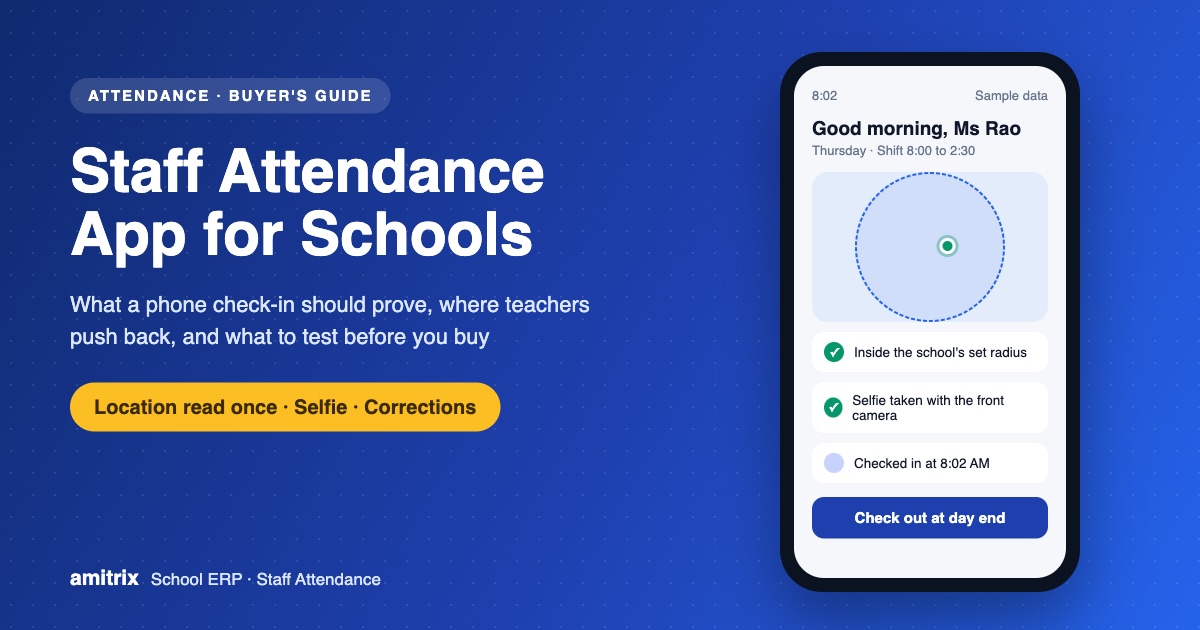
When a teacher taps Check in, a well-built app takes one reading of the phone's position and compares it with a point and a radius the school has set. If the school wants it, the front camera takes a selfie at the same moment. That's the whole check.
It can prove that this phone was inside the school's circle at 8:02, and, with a selfie, that the person holding it was the teacher. It can't prove that the teacher stayed until 2:30. Only the check-out does that, and a missed check-out has to land somewhere sensible (more on that below).
The radius matters more than most schools expect. Draw it tight around the main building and a teacher checking in from the staff room on the ground floor may be refused, because phone GPS indoors often reads well off the true spot. Draw it around the whole campus, with some room to spare at the edges, and test it from the corners of the site before the first Monday. In Amitrix the starting radius is just 10 metres, so this is the first setting a school changes.
Where Teachers Push Back, and How to Avoid It
Most objections come down to three fears. Teachers worry about being followed after school. Many share one phone with their family and would rather keep a work app off it. And few are ever told who will see their selfies.
The first fear has a technical answer. An app that reads location only when someone taps the button, and asks for no background location permission, can't follow anyone home. Ask a vendor which permissions their Android app requests, and read the list yourself.
The other two need a written policy, handed out before anyone installs anything:
- what is collected (one location reading and, if switched on, one photo at check-in and check-out);
- who can see it (the office roles that manage attendance, not other teachers);
- how long selfies are kept;
- what happens for a teacher who can't or won't use a personal phone.
That last point decides whether the system survives. A teacher without a smartphone should be marked by the principal or the office, with the change recorded, not left out.
Selfies and location are personal data under the Digital Personal Data Protection Act. Telling staff exactly what is collected, and why, is part of the school's duty as well as good manners. A school's DPDP duties, set out step by step, cover notices and consent for staff as well as students.
One Day in the Records
The check-in itself takes seconds. What makes an attendance app useful is everything it does with the record afterwards.
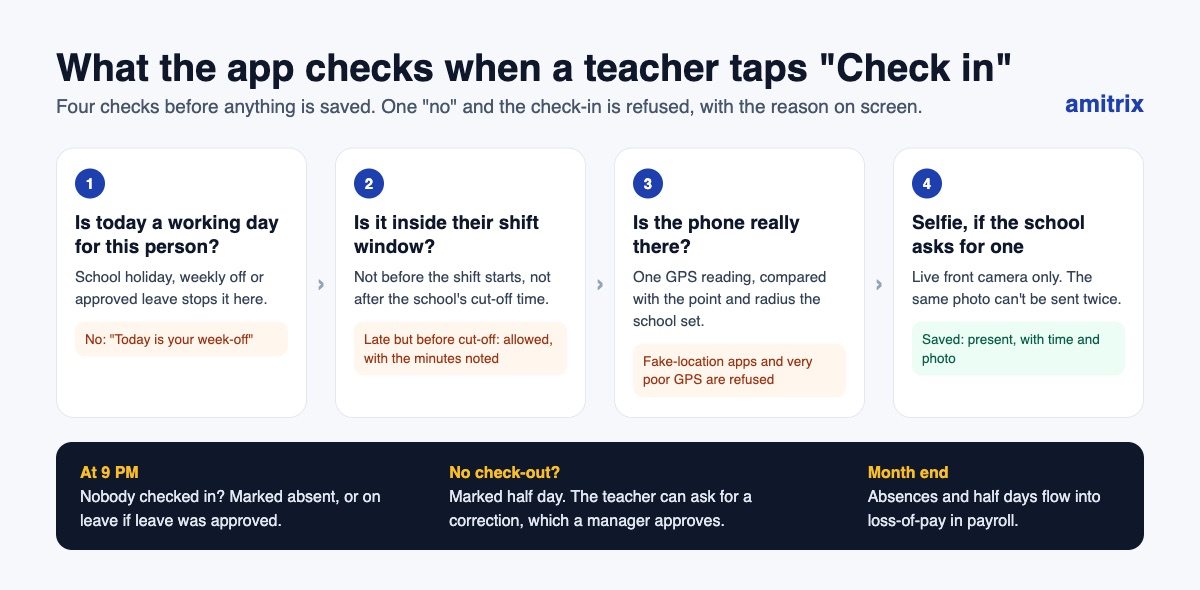
A teacher who arrives twenty minutes late, but before the school's cut-off time, is still marked present. The record keeps a note of how many minutes late they were, so the principal sees a pattern without anyone keeping a separate late register. After the cut-off, the app refuses the check-in, and the day has to be sorted out by a correction request.
At night the system closes the day. Anyone who never checked in becomes absent, or on leave if their leave was approved. Anyone with a check-in but no check-out is put down as a half day. That is deliberately harsh, because it pushes the teacher to raise a correction, and a manager or the principal approves it with a reason on record. Nobody approves their own.
Holidays and weekly offs never produce an absence. The app won't accept a check-in on those days at all, and it won't on a day the teacher is on approved leave either.
Overtime works the other way. Hours beyond the shift are worked out from the check-in and check-out times, a manager approves them, and the approved hours go to payroll at the school's overtime rate. So do the absences and half days, as loss of pay. If attendance and payroll live in different systems, someone retypes that list every month.
Seven Things to Check Before You Buy
Run these in a demo, on a phone, standing where your staff would stand:
- Check in from the staff room and from the far gate. If either fails, ask how the radius is set and who can change it.
- Turn on a fake-location app and try again. A good system refuses the check-in, it doesn't just note it.
- Look at the permissions the Android app asks for. Background location should not be on the list.
- Ask to see where selfies are stored, who can open them, and how old photos are deleted.
- Forget to check out, then see what the record says the next morning and how the correction is approved.
- Mark a teacher present from the office, as if their phone were broken, and check that the change shows who made it.
- Ask for one month's attendance for all staff, and follow one half day through to the salary slip.
Before signing, compare the rest of the system too. The checklist for choosing a school ERP covers the other modules, and buyers in Haryana and Uttar Pradesh have their own lists for Gurugram schools and Noida schools.
We'll set a radius around your school's address and let your staff check in during the call.
Try the seven checks on a real phone →Where Amitrix Fits, and What It Costs
Staff attendance in Amitrix works from the Android app or the website. The check-in compares one GPS reading with the school's point and radius, refuses fake locations and very poor GPS fixes, and takes a front-camera selfie when the school switches that on. The same photo can't be sent twice. Shifts set each person's start and cut-off times, and teachers on a work-from-home, field or travel day get an approved location request in place of the campus check.
A daily screen shows the principal, admin, HR and the accountant who is in, out, on leave or on a half day, and how Amitrix limits each role's access applies here as everywhere else. Corrections and overtime go through approval, the principal or admin can mark a day by hand with the old status kept in the record, and a month's attendance exports to Excel. Payroll then counts absences and half days as loss of pay without anyone copying figures across.
Some schools need something else. Amitrix doesn't connect to biometric machines, doesn't do face recognition or RFID cards, and doesn't send an SMS or app alert when a teacher is late. A check-in also needs a data connection at that moment. If your school already runs a biometric machine that staff trust, keep it, and compare on the parts that come after the check-in.
One yearly price of ₹12,000 covers the school, staff attendance and payroll included, and a new teacher adds nothing to it. Every module in that price is listed in one place.
We'll walk through one teacher's month, from the first check-in to the salary slip.
Show your principal the 9 PM close →Frequently Asked Questions
Can a school make teachers use their personal phones for attendance?
Many schools ask, but it works better as an agreement than an order. Offer an alternative for staff who don't want a work app on a family phone, such as attendance marked by the office, and put the choice in the written policy.
Is a selfie with GPS better than a biometric machine?
They solve different problems. A biometric machine at the gate needs no phone and no data connection, but every device has to be bought, maintained and fixed when it fails. A phone check-in needs no hardware and also covers teachers on field duty, but depends on staff phones and on the radius being set well.
What happens on a day the app stops working?
The principal or admin marks those teachers by hand for the day. In a good system the record shows who made the change and what it was before, so the salary figures still hold up when the month closes.
Does the app work for non-teaching staff?
Yes. Drivers, office staff and support staff check in the same way, each with their own shift. Field and travel days are covered by location requests that a manager approves.
Is staff attendance the same as the 75% rule for students?
They're separate records. Student attendance is marked by teachers for each class and matters for board eligibility, which is why schools track the 75% rule class by class. Staff attendance records the employee's own working day and feeds salary.
Write the Rules Before Anyone Downloads the App
Agree four things with your staff first: the radius, who sees the selfies, what happens without a phone, and who approves corrections. Put them on one page and hand it out at a staff meeting. Then switch the app on.
If you'd like to see that page put into practice, book a time with us and bring your school's address and shift timings.