
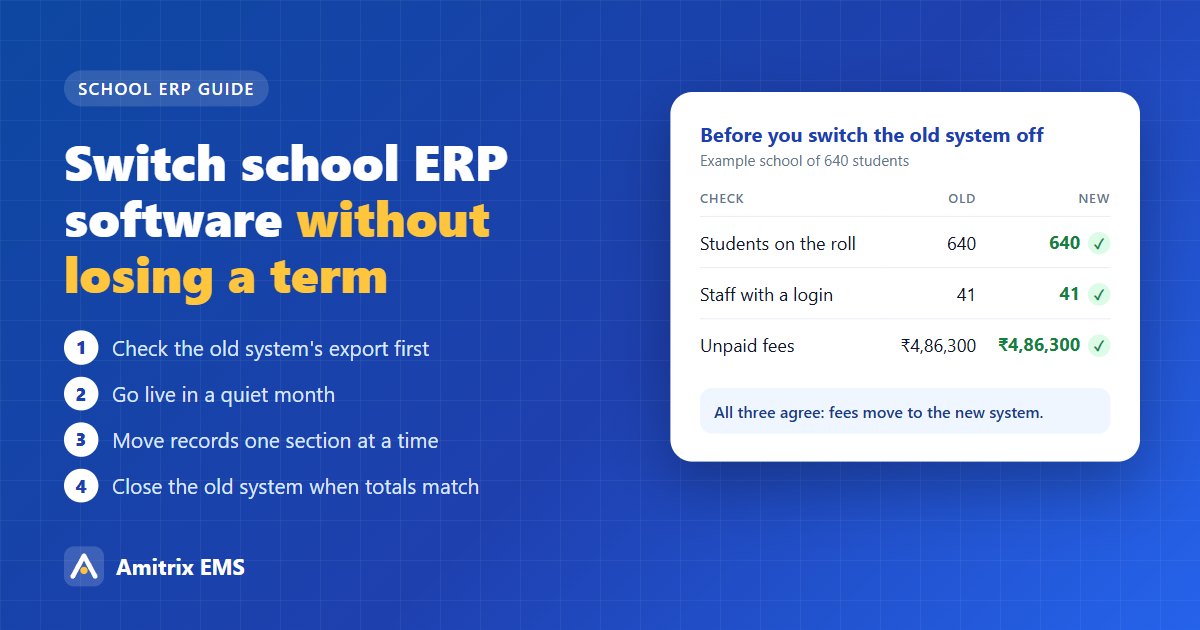
When a school changes its ERP software, the costly mistake is giving notice to the old vendor before anyone has opened the data that comes out of it. Every family's unpaid fees, the admission register and years of attendance sit inside that system. If the export turns up late, half-filled or as a stack of PDFs, the new software can't start where the old one stopped, and the office loses a term to retyping.
The order that avoids it:
- Get a complete export and check it against your own registers.
- Go live in a month when the office has the least going on.
- Migrate the records one section at a time.
- Keep the old system readable until the new one's totals match it.
Get the Export Before You Give Notice
Read the exit clause in your contract first. It says how long the vendor has to hand your data over after notice, in what format, and whether the export costs extra. Then ask for the export as a routine request, in files you can open in Excel, one sheet per kind of record:
- every student on the roll, with admission number, class, section, roll number, date of birth and admission date;
- each child's parents or guardian, with phone numbers, so brothers and sisters can be matched;
- the fee plan each child is on, with any standing concession;
- every unpaid bill for this session, month by month, not one balance per family;
- fee receipts for this session and the ones before it;
- attendance per child per day, for every session the system holds;
- marks for exams held so far this session;
- staff, with designation, date of joining and salary details;
- the transfer certificates issued, with their numbers.
Load only this session, but keep the older years as an archive for the auditor and for old TC requests.
Open the files the day they arrive. Count the rows for one section against the class register, and check the phone numbers of three children you know. A corrected export is far easier to get while the old contract is still running. If the old software runs on a server in your office, the export is your own job; the cloud vs installed comparison covers who holds the data in each case. Note anything else tied to the old vendor too, such as the parent-login link on your website or an SMS account in the vendor's name.
Then settle the deletion. The main duties of the Digital Personal Data Protection (DPDP) Act, 2023 apply to schools from May 2027, and under it your school answers for the children's data while the software company only processes it. Ask now for written confirmation that the old vendor will delete its copy, but only after you've checked that the new system holds everything.
When to Switch School ERP Software: A Month-by-Month Calendar
The right month is the one in which the fee counter and the exam office have the least going on. For a school with an April-to-March session in north India, the year looks like this; the Delhi dates are last year's.
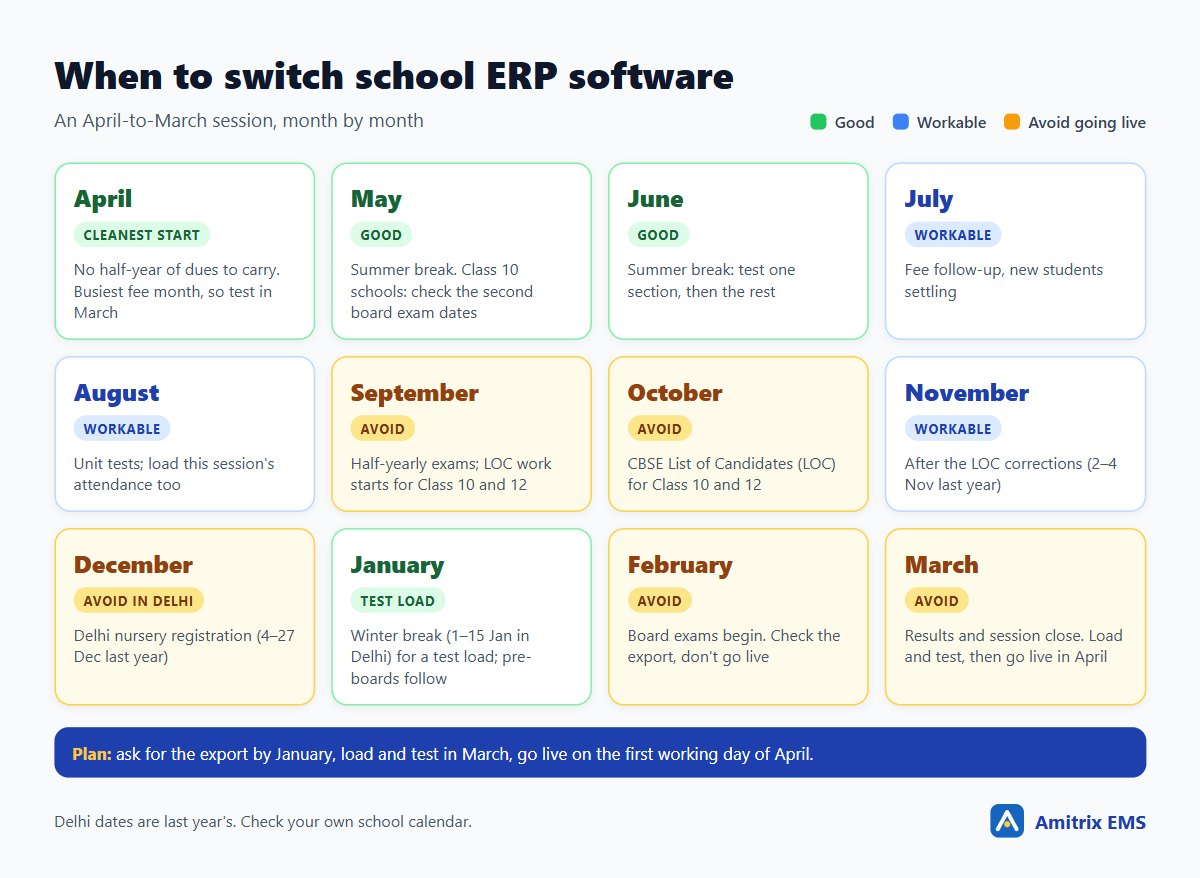
| Month | Busy with | Switch? |
|---|---|---|
| April | New session, the busiest fee month | Cleanest start, if loaded and tested in March |
| May–June | Summer break | Good; Class 10 schools check the second board exam dates |
| July–August | Fee follow-up, unit tests | Workable |
| September–October | Half-yearly exams, CBSE List of Candidates (LOC) | Avoid |
| November | LOC corrections (2–4 Nov last year) | Workable after the first week |
| December | Delhi nursery registration (4–27 Dec last year) | Avoid in Delhi |
| Winter break | 1–15 January in Delhi last year | Good for a test load |
| Late January–March | Pre-boards, board exams, results | Avoid going live |
April is the cleanest start because no half-year of unpaid dues has to be carried across. It's also the counter's busiest month, so do the loading and testing in March. Schools with Class 10 or 12 should keep clear of the CBSE LOC submission weeks, since every detail the board sees comes from your records. If April has gone, use a break, and switch mid-session only when the old system is failing you every week.
Migrate the Records in This Order
- Set up the session, classes and sections. Everything else attaches to a section, so a missing or misspelt one makes every later upload fail.
- Bring in students with their parents, one section at a time. Read the first section's error report before doing the rest; it's the same test a student management system should pass in a demo. Give siblings the same parent phone number so they're linked to one family.
- Add staff and their logins, then designations, joining dates and salary structures before the first payroll.
- Create the fee plans, assign them, then bring across this session's unpaid months. Check part-paid months family by family; that's where totals drift.
- If you're switching mid-session, load this session's attendance. The file has to find each child by admission number, so if the new system has issued new numbers, swap them in from your old-to-new sheet first.
- Hand out parent and teacher logins once the checks below have passed.
Check Nothing Was Lost Against Three Totals
An example, with made-up figures. A school of 640 students moves during the summer break. Before anyone switches the old system off, the office compares three totals.
| Check | Old system | New system |
|---|---|---|
| Students on the roll | 640 | 638 |
| Staff with a login | 41 | 41 |
| Unpaid fees, this session | ₹4,86,300 | ₹4,83,900 |
The two missing students are rows the upload sent back. One girl's guardian phone was blank, and a boy had the same roll number as a classmate. Both take ten minutes to fix once someone reads the report.
The ₹2,400 gap takes longer. The new system shows a Class 6 boy without the bus route the old one charged him for, at ₹1,200 a month for two unpaid months. Assign the route, raise the two bills, and the totals match.
Don't close the old system until all three numbers agree. A gap you can explain today becomes an argument with a parent in October.
Change the names first, or use our sample school, and we'll go through the error report row by row.
Load a sample section with us →Should the Old and New Systems Run Side by Side?
Not for a month or more. Running both means every payment is typed twice, and sooner or later the two copies disagree. Pick a cut-over date instead. From that morning the counter takes fees only in the new system, and the old one stays readable for at least two months so the accountant can look up an old receipt.
Get that read-only access in writing. If the vendor refuses, download every class's fee and attendance reports as PDFs before the last day.
If the new system isn't chosen yet, how to choose a school ERP is the checklist to use.
What Moving to Amitrix Looks Like
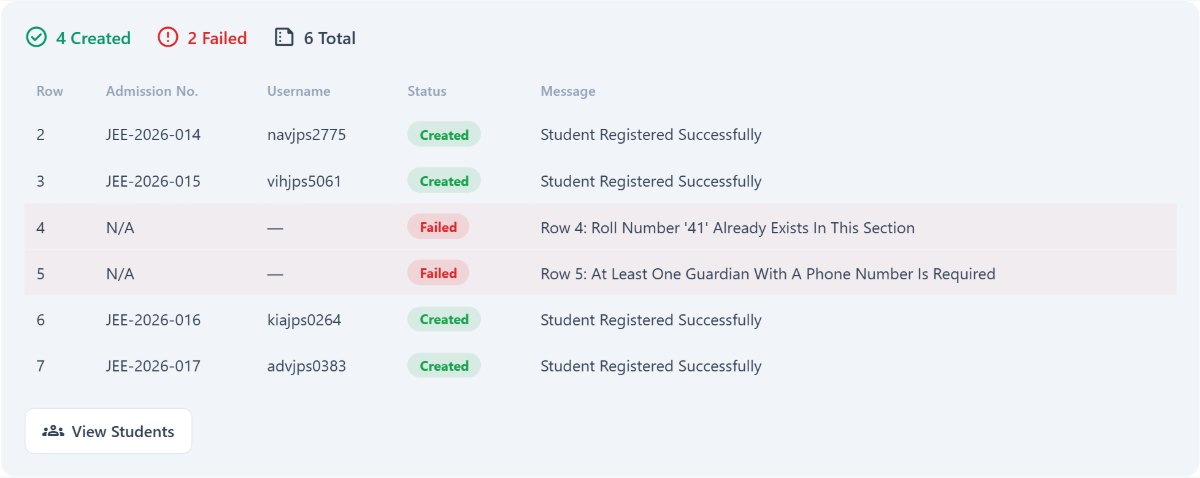
An Amitrix student upload with demo data: 6 rows in, 4 students created with numbers in the demo school's series, and 2 returned with the reason for each.
Students come into Amitrix school ERP software from an Excel template, a section at a time. Every valid row becomes a student, with a new admission number from the school's own series and a parent login built from the guardian's phone. When a second child carries the same parent's phone, Amitrix links that child to the parent already created. Staff come in from a short sheet of names, logins, phones and roles. Attendance has its own import, with a preview before anything is saved. Bills for past months are raised a section at a time after a confirmation step, and the accountant cancels the copies for families who had already paid that month in the old system. The data migration and staff training we include cost nothing extra, and the yearly plan lists the rest of what the one price covers.
Limits to plan around:
- Old admission numbers aren't carried over. Keep the old-to-new sheet for good, because TCs already issued and the paper admission register still carry the old numbers.
- The staff sheet carries logins and roles only. Salary structures and joining dates are entered after the upload.
- Receipts from the old software don't come across as receipts. If your auditor needs past years' receipts searchable inside the new system, Amitrix can't do that, so keep the old export.
We'll upload one section of our sample school and fix its two broken rows with you.
See a sample class come in →Frequently Asked Questions
How long does switching school ERP software take?
Count back from the go-live date. As a sample plan for a 1 April start, a contract with 90 days' notice means writing to the old vendor by 1 January. Allow two weeks for the export and a week to check it, then load and test one section before the rest in March. The export is the part you control least, so ask for it first.
Who owns the data in our current school management software?
The school does, whatever the vendor's screens suggest. How easily you get it depends on the contract, so look for the export format, the notice period and any fee for an export, one of the costs school ERP quotes often leave out. If the contract says nothing, ask for the export by email so the request and its date are on record.
Can we switch to a new system halfway through the year?
It works if you load this session's attendance as well as the students, so percentages for CBSE's 75% attendance rule don't restart from zero. Switch during a holiday week, so the first fee day isn't also the first login day.
Should we tell parents before changing the software?
Tell them a week before, in one message: the new login, a line saying receipts will look different, the office number for the first week, and the assurance that nothing they've paid is lost.
Send the Export Request This Week
Write the email today, before any decision is announced. Ask for every record in the list above, in Excel, by a date two weeks away, and copy the principal so the request is on record. When the files arrive, check one section against its register and the fee total against the accountant's figure.
A complete export means you can switch whenever a quiet month allows. An incomplete one tells you so before you've cancelled anything. With the files in hand, book a demo of the move and we'll walk a sample section across with your office staff.