
Ten days before a month ends, next month's fee bills should already be sitting in the system for every class, waiting only for your accountant to check the preview. That's what school fee management software is for. When a parent pays two months at the counter on the 8th, the receipt, the child's dues and the class's defaulter list should all change in the same minute, with the sibling discount and any late charge already counted the way your school decided.
Without it, the trouble sits in the work around the fee: bills typed one by one, a concession nobody can trace, a late fee that two clerks work out differently, a defaulter list that's out of date the day it's printed.
What Is School Fee Management Software?
It's the school's record of what every family owes and why, kept so that collections and dues can be read by class, by student or by the staff member who took the money.
A UPI app or payment gateway only moves money from a parent's bank to the school's. It can't tell that a ₹2,400 transfer was meant for July's transport and August's tuition, so the office still enters the transaction reference against those two bills, and that's the record fee software keeps.
What Fee Software Should Handle
Take a family with a daughter in Class 3 who rides the school bus and a son in Class 7 who doesn't. Their August bills come out of one run for the whole school, transport appears on the daughter's bill alone, and the sibling concession on the son's bill shows who signed it off.
The mother clears both bills at the counter with one UPI transfer. The office records it once, against both children, with the UPI reference, and the receipt that prints has its own serial number and every detail a fee receipt needs. Their July bill was late, so its late fee sits on a line of its own, worked out from the school's rule and held at the cap.
The family drops off the Class 3 and Class 7 defaulter lists the moment the money is in. A bill raised by mistake stays on file, stamped cancelled, for the auditor to see. At month end, that one payment shows up in both the class-wise and the cashier-wise totals, ready for your accountant to export.
One Month in the Fee Office, Step by Step
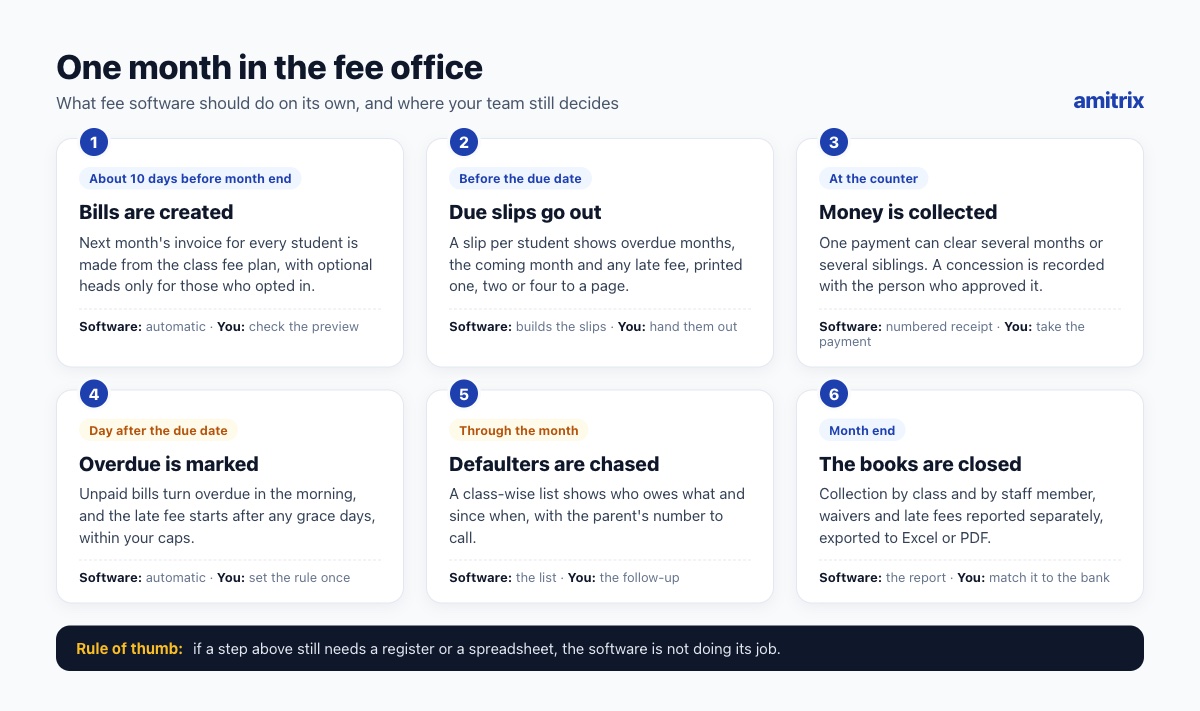
- Raise next month's bills around the 20th. The software builds them from each class plan, and your accountant only checks the preview, which should show how many students will be billed and how many already have a bill.
- Hand out due slips before the due date. Each slip lists the overdue months, the coming month and any late fee, so nobody is surprised at the counter.
- Collect at the counter, recording each payment's mode and reference, and note any concession with its approver.
- Let unpaid bills turn overdue the morning after the due date, with no one ticking them by hand. Say the due date is the 15th and parents get a week's grace. No late fee should appear before the 23rd, and once it reaches your cap it should stop climbing.
- Chase the families still owing from a class-wise list that gives each one's balance, oldest unpaid month and a number to ring, and use polite fee reminder wording for each overdue stage.
- Close the month. Pull collection by class and by cashier, check waivers and late fees on their own lines, export the report and match it to the bank statement.
A school that bills by term rather than by month runs the same six steps once a term.
What the Software Takes Over, and What Your Office Keeps
Good fee software takes away the arithmetic and leaves your staff the decisions.
| Task | Software | Office |
|---|---|---|
| Monthly bills | One run, all classes | Checks the preview |
| Concession | Reason and approver kept | Decides who gets one |
| Late fee | One capped rule | Rules on waivers |
| Who owes | Updated on payment | Calls the parent |
| Month end | One report | Matches the bank |
Ten Things to Test in a Demo
Have the presenter do each of these on screen, in a class set up with your own fee heads and a few made-up students:
- Generate a month's bills for one class, and look at the preview before saving.
- Give one student transport, then check that classmates without transport weren't billed for it.
- Collect three months in one payment, and read the receipt that comes out.
- Take one payment for two siblings in different classes.
- Add a concession, then find out a week later who approved it.
- Take one bill past its due date, then check its late fee on a day inside the grace period (it should be nil) and on a day months later (it should sit at your cap).
- Waive a late fee, then look for it in a waiver register.
- Cancel a wrong entry. It should stay on record, marked cancelled, not disappear.
- Print due slips for a whole class in one go.
- Ask for last month's collection by class and by cashier, and export it to Excel.
Keep to that one class for all ten, so a slip in one test shows up in the next. And if the presenter reaches for Excel to answer any of them, note it down, because whatever needs a spreadsheet in a demo will need one at your fee counter every month.
We'll build sample data from your own fee heads and run each test on screen.
Run the ten fee tests live →The Same Month in Amitrix
In Amitrix's fee module, next month's bills are created automatically a set number of days before month end (ten by default; the school can change it or switch it off), and nothing is saved until the accountant has looked at the preview. A single payment can settle several months or two siblings' bills, every concession keeps its approver's name, and there are five receipt styles to choose from. The penalty can grow by the day or by the month, be a single amount, or be a share of what's unpaid. It waits out the grace days and stops at a cap in rupees or percent. Waiving it is allowed only within limits the school sets, and each waiver is listed in a register of its own.
Each morning, bills past their due date turn overdue, and the class-wise defaulter list shows the oldest unpaid month and the parent to call. A whole class's due slips come off the printer in one go, one, two or four to a page, and month-end collection can be split class by class, or by the staff member who took the money, then exported to Excel or as a PDF.
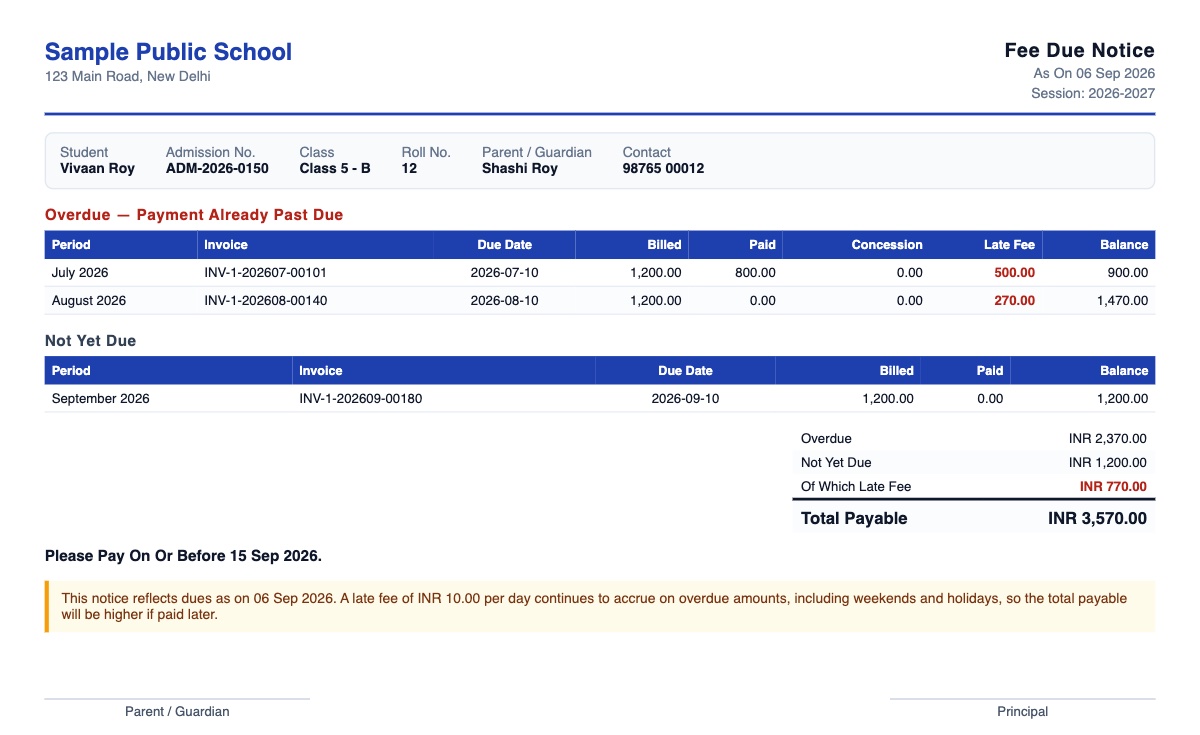
A due slip printed from Amitrix (demo data): ₹2,370 overdue, of which ₹770 is late fee, plus ₹1,200 not yet due, so ₹3,570 payable by 15 September 2026.
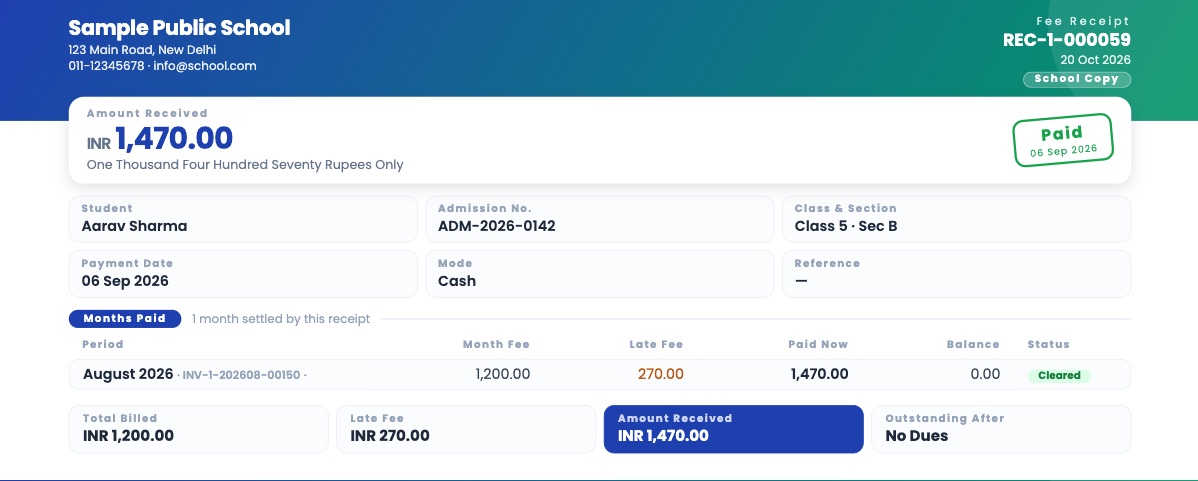
The receipt when that August bill is paid (demo data): the ₹270 late fee sits apart from the ₹1,200 fee.
Choosing the late fee rule is a policy decision before it's a software setting, so agree the grace days, cap and waiver rules for a school late fee first. Delhi schools have one more check: a fee head that the Delhi School Fee Regulation Act 2025 doesn't permit has no place in the fee plan at all.
Fee Data and Parents' Privacy
Fee records hold names, phone numbers and, for hardship concessions, a family's income. If a vendor leaks them, India's Digital Personal Data Protection Act still holds the school to account, because the school decided to collect that data. So before signing, find out who on the staff can read a concession's reason, whether one parent could ever open another family's bill, and which city the servers sit in. Amitrix stores fee data on servers in Mumbai, and its fee screens open only for office roles such as the admin, principal and accountant, never for a teacher. Consent forms and the steps after a data breach are set out in the school DPDP checklist.
What It Costs
Fee management is usually sold inside a school ERP rather than on its own, so compare the total cost per student per year, with setup and data migration counted, instead of a headline monthly figure. How ERP vendors price their software (by headcount, by module, or one flat fee) can change that total a lot.
Amitrix bills the whole school ₹12,000 for the year, fees and every other module included, and that figure doesn't move when admissions grow. Your old fee records are moved across at no cost; see what the yearly fee covers.
Bring this session's fee structure, and we'll bill one class for a month and print its due slips while you watch.
Set up one class's fees with us →Frequently Asked Questions
What is the difference between fee management software and a school ERP?
The fee module is one part of a school ERP; the rest covers the office's other work, from admission forms to report cards and staff leave. When both share one database, a child who moves from Section A to Section B in July is billed under the right section without anyone retyping a list. For the other modules, use the checklist for picking a whole school ERP.
Does fee software calculate late fees automatically?
It should, as long as someone has decided how the fee is charged, how many days of grace parents get and where it stops. The risky day is the one a new rule goes live: Amitrix first shows how many bills it would touch, and asks whether bills that are already overdue should be charged as well.
Can parents see their fee details in the app?
Yes. In the Amitrix app a parent opens their own child's bills, what's still due and every payment made, and can't reach another family's records. Brothers and sisters show up under one login, linked through the guardian's mobile number at registration, and the rest of the parent app works from the same account.
Before Your Next Vendor Demo
Print the ten tests and hand the sheet to your accountant before the presenter starts. A test earns a tick only when it's done on screen, on the class you set up. Your accountant will be the one running the fee month, so the vendor with the most ticks on their sheet is the one to call back.
If Amitrix is one of those vendors, pick a demo time and bring that class's fee heads.