
In CBSE's 2026-27 curriculum, the 20 internal-assessment marks in Class 10 Science come from four parts worth 5 each: periodic assessment, multiple assessment, portfolio and practical work. Class 10 Mathematics splits its 20 another way, with 10 for a pen-and-paper test plus multiple assessment, 5 for the portfolio and 5 for lab activities. A card that just says "Internal assessment 17" is the sum of marks given on different days, sometimes by different people.
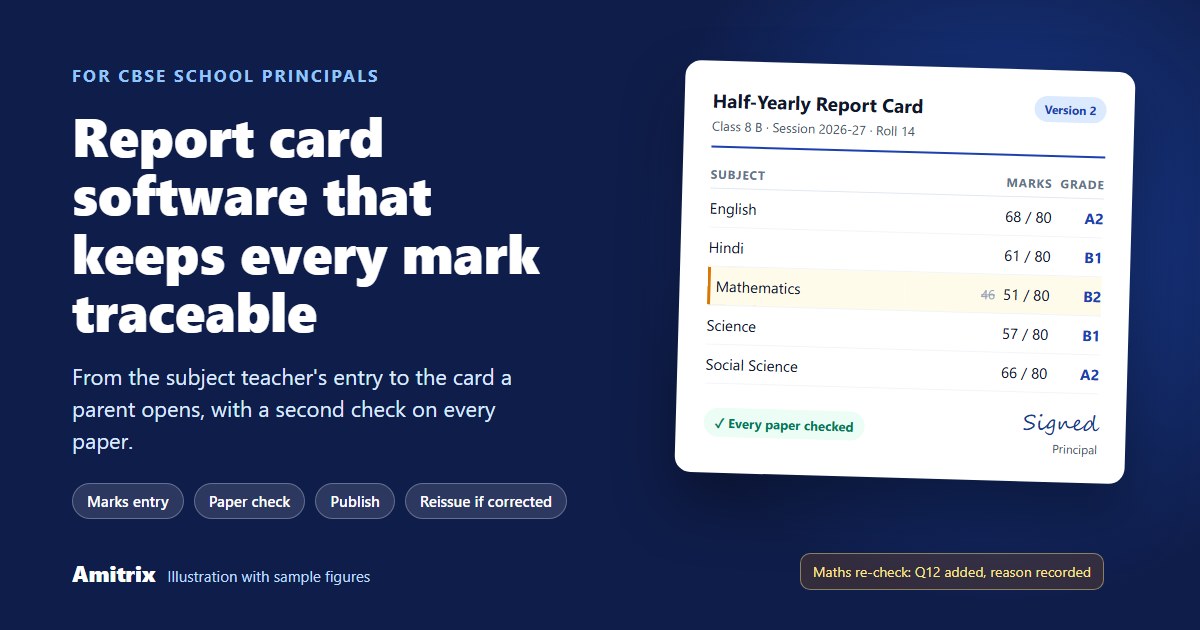
Good report card software for CBSE schools carries each mark from its subject teacher to a published card the parent can open, and keeps that chain honest. Each teacher enters only their own subject's marks, a mark above the paper's maximum is turned away, a second person checks every paper, and parents see the card only once the school publishes it. A mark corrected after that should produce a new card, with the old version and the reason kept on record.
Judge vendors on that week, from the last paper to the evening parents open the card. The printed template is the easy part.
What Has to Happen Between the Last Paper and Results Day
- Plan the session's exams once, with each one's weight in the final result: say two unit tests at 10% each, a half-yearly at 30% and the annual exam at 50%.
- Fix the date sheet, the maximum and the pass mark of every paper before anyone types a mark.
- Let each subject teacher enter marks only for the sections they teach, keeping "not entered yet", zero and absent apart.
- Have someone other than that teacher check each paper.
- Work out totals, grades and ranks from the school's own rules.
- Publish class by class, holding back any result the office needs to discuss with a family first. Unpaid fees can't be that reason in Delhi, where the 2025 fee law bars withholding results over fees.
- Lock what's published, and reissue the card rather than overwrite it when a mark is corrected.
Mistakes that reach parents tend to start at step 3. A blank that should have said Absent counts as 0, and a 0 that meant "not entered yet" drags down the class average quoted at the parent-teacher meeting. Once someone else retypes the marks from a spreadsheet, nobody can say which number the teacher gave.
The 2026-27 Split a CBSE Card Has to Carry
For Class 10, CBSE sets the split itself, subject by subject. These figures come from its 2026-27 curriculum documents for Science and Mathematics:
| Class 10 subject | Internal 20 marks |
|---|---|
| Science (paper of 80) | Periodic assessment 5, multiple assessment 5, portfolio 5, practical work 5 |
| Mathematics, Standard or Basic (paper of 80) | Pen-paper test and multiple assessment 10, portfolio 5, lab practical 5 |
In Science, Periodic Classification of Elements, Heredity and Evolution, and Effects of Electric Current stay in the syllabus but won't be tested in the year-end paper; students get credit for them through periodic assessment or the portfolio. So those two columns cover chapters the 2027 board paper won't test.
Ask any vendor whether each part gets its own column or shares one internal figure. With one figure, teachers keep the part-wise sheet themselves, since a total can't show how it was reached.
Class 8's Half-Yearly, From Monday's Last Paper to Tuesday's Re-check
Picture a Class 8 with three sections and six papers, so the half-yearly produces 18 marks sheets (the figures here are invented). The last paper is on a Monday.
- On Wednesday evening, sixteen sheets are in. The missing two are Hindi and Sanskrit for 8C, whose teacher is on leave, so the exam in-charge enters them from the answer books she left marked.
- On Thursday the coordinator opens the checks. Science in 8B averages 52%, against 71% and 69% in the other two sections, and the software flags the gap. Ten 8B answer books show the long answers were marked to an older key. She sends the paper back with a note, the teacher corrects it that afternoon, and it's checked again, since changed marks can't keep an old tick.
- On Friday the principal's summary shows 96 students, 91% passed and every paper checked. She holds back one result until she has met the parents, and schedules the rest for Saturday at 5 pm.
- At 5 pm on Saturday the cards go out; the family whose result is held is asked to contact the office.
- The next Tuesday, a father asks for a maths re-check. Question 12 was never added in, so 46 becomes 51. The office reopens that result with a reason, the old card stays on record as version 1, and the family sees "under revision" until the corrected card replaces it.
If a vendor answers any of those days with "export it to Excel and fix it there", that's the day the record breaks.
Board Format, Language and the Signature on the Card
Check that the card follows your board's format in each language your parents read, and prints your logo, the principal's signature and the school stamp without anyone pasting them in.
Grades should come from bands the school sets once (A1 for 91–100, if that's your scale), not from a vendor's fixed list. The annual card should bring the year together with each exam's weight, subject-wise percentages, co-scholastic grades, attendance and the promotion decision. A student who joined after the first unit test shouldn't get a zero for it; that test's weight should be shared across the exams they did sit.
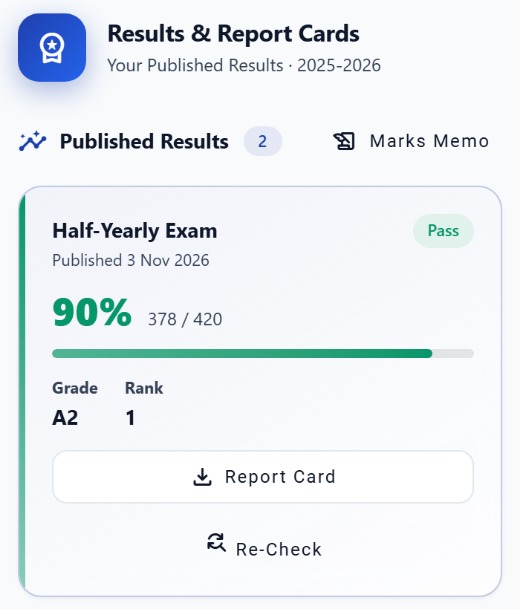
What a sample Class 5 student sees on a phone once the half-yearly is published (demo data): the percentage, grade and rank, the report card to download, and a re-check request.
Eight Checks to Run on CBSE Report Card Software
With a teacher login and an admin login open side by side:
- As the maths teacher, try to enter English marks for a section you don't teach. It should refuse.
- Type 82 into an 80-mark paper, then 38.5. The first should be refused; the second kept if your school allows half marks.
- Leave one box empty, mark one student Absent and give another 0. Ask how each affects the total, the class average and the rank.
- Ask the teacher who entered a paper to check it as well. That should be refused.
- Publish one section, then change one of its marks. It should need reopening with a reason, keep the old version and tell the family.
- Print one student's card in English and in Hindi side by side, and look at the signature, the stamp and the grade line.
- Download a whole section's cards and see what arrives: one file per student, or one PDF to print.
- Hold back one student's result and log in as that parent. See exactly what they're told.
Checks 4 and 5 matter most. Without them you still get a neat card, but nobody can tell you later whose mark it was.
We'll use sample classes, so you needn't bring anything.
Trace one mark live →Amitrix as Exam and Result Software, Limits Included
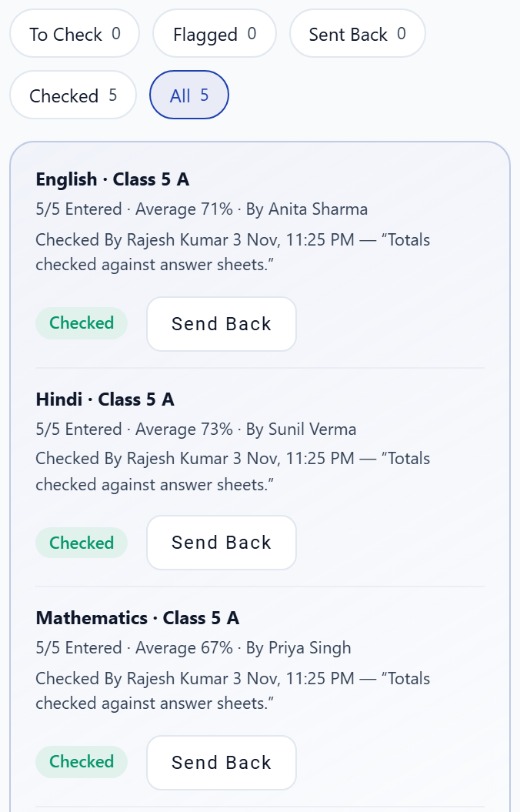
The Checks tab for a sample Class 5 A (demo data): each paper shows 5 of 5 marks entered, the average, who entered them and who checked them, with a note.
In Amitrix, a school ERP for Indian schools, marks, paper checks and report cards live in one Examinations module. Teachers enter marks for their own subjects and sections on the website or the Android app, or upload an Excel sheet and see each faulty row before anything is saved. The checks screen flags a paper when every student has the same mark (five or more students), when 30% or more have 0, when half or more have full marks, or when a section's average is 15 or more points below the other sections in that subject. Cards follow the CBSE, ICSE or state board layout the school picks, and a CBSE card can also be issued in Tamil, Marathi, Gujarati or Hindi. Attendance on the card is taken from the daily attendance teachers mark, and parents read the published card in the parent app or on the website, where they can ask for a re-check.
What it doesn't do:
- Each paper holds one theory mark and one practical or internal mark, not CBSE's four internal parts, so teachers keep the part-wise sheet.
- It doesn't make the Holistic Progress Card.
- It doesn't upload marks to CBSE's portal; the plan for CBSE's 2027 practical exams covers that step.
- Parents see results when they open the app or the website; results don't go out by SMS, WhatsApp or phone notification.
- A section's cards download as a ZIP with one PDF per student, not as a single file to print.
- The CBSE nine-point grade scale is a preset the school picks in settings; nothing is graded until a scale is chosen.
Exams aren't an add-on in Amitrix's pricing, and choosing an ERP for schools shows how exams sit beside fees, attendance and staff records.
We'll import a sample sheet, show you the rows it turns back, and publish the cards while you watch.
Import a sample sheet →Frequently Asked Questions
Is there free CBSE report card software to download?
Downloadable desktop programs turn up in search results, some sold for a one-time fee. Ask where the marks are stored. If it's one office computer, teachers usually can't enter their own subjects, parents can't read the card online, and the only backup is whoever copies the file. For a school with one section per class and one person typing every mark, that may still be enough.
Who should write the remarks on a report card?
The class teacher, who sees the student daily, with the principal adding a line where needed. A remark that would fit any child tells a parent nothing; a useful one names one thing done well this term and one to work on.
Rerun Last Session's Half-Yearly on the Vendor's System
Take one class's half-yearly marks from last session, change the names, and keep the cards you issued. Ask the vendor for the same cards with your grade bands and weights, and compare them line by line. Each difference is a mistake you didn't know about or a rule the software can't follow, and you want both found before you sign.
With that sheet ready, see your own exam set-up run through to the cards; the full list of Amitrix modules shows what sits around exams.